
Case Status
Case Status, IncCommunication
4.91.72K Reviews
- Version
- 2.6.38
- Installs
- 500.00K
- Age Rating
- Everyone
Screenshots
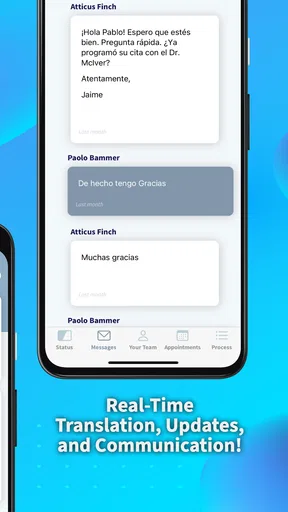
Our Review of Case Status
 Analysis by Appyee
Legal matters are difficult enough without repeatedly calling an office to ask whether anything has changed. I found Case Status useful because it focuses on one practical communication problem: keeping an eye on a legal case from a phone instead of relying entirely on memory, voicemail, or scattered messages. It is a free communication app from Case Status, Inc, and its purpose is refreshingly narrow rather than overloaded with unrelated tools.
My overall impression is that its value depends less on entertainment or customization and more on whether your legal representative uses it as part of your case communication. When that connection is in place, the app can make waiting feel more manageable. When it is not, there is little reason to install it simply because the name sounds relevant. That distinction is important, and it is the first thing I would explain to a friend considering it.
What the app is really for
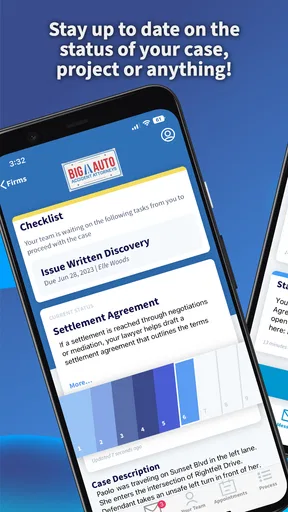
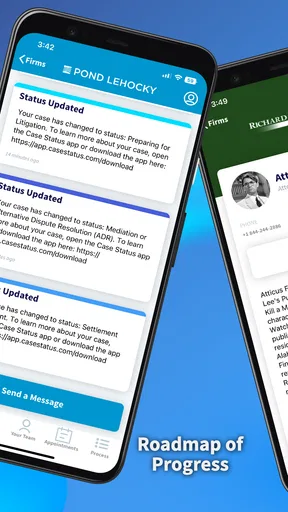
Case Status is designed for people who want updates about an ongoing legal case in one place. I would put it in the category of focused communication tools rather than general messaging, document management, or legal research apps. It is not something I would use to learn legal terminology, compare attorneys, or replace professional advice. Its useful role is much more specific: checking the current state of a case and staying aware of communication connected with it.
That narrow purpose is also its main strength. Legal cases often move slowly, and the absence of news can be just as stressful as receiving a complicated update. Having a dedicated place to check can reduce the temptation to search through old email threads or wonder whether a message was missed. I particularly like the idea of separating case-related communication from ordinary personal chats, where an important update can disappear among everyday notifications.
The app has been available since October 13, 2017, and the current version is 2.6.38. It is free to use and rated for Everyone, which makes the basic entry barrier low. Case Status, Inc is the developer behind it. On the Android side, it supports devices running Android 6.0 or later, so owners of very old phones should check compatibility before planning around it.
How quickly it feels useful
In my experience with an app built around case updates, the important question is not whether every screen opens with dramatic speed. The real test is whether I can reach the relevant case information without unnecessary wandering. Case Status benefits from having a clear job: I open it because I want to check legal communication, not browse a crowded feed or configure a complex productivity system.
That focus makes short check-ins practical. A person waiting for movement in a case can open the app during a lunch break, review what is available, and return to the rest of the day without turning the process into a major task. I would not treat a quick glance as proof that a case has changed, though. A quiet screen may simply mean there is no new communication to review, and legal progress is still governed by the people and institutions handling the matter.
There is also a useful habit here: check the app at a deliberate time rather than repeatedly opening it whenever anxiety appears. That does not make the case move faster, but it can prevent the app from becoming a source of constant checking. I would suggest choosing a routine that fits the situation, such as looking once in the morning and once later in the day when an active matter requires closer attention.
The app can organize awareness, but it cannot accelerate the legal process. That sounds obvious, yet it is an important performance expectation. No communication app can turn a delayed response into an immediate decision. Its speed matters because it reduces friction when information is available, not because it changes the pace of the case itself.
When the case becomes busy
The most demanding period for a case-status tool is likely to be a busy stretch when several messages, changes, or reminders arrive close together. This is where a focused app can be more useful than relying on a normal text-message thread. A dedicated case context gives each update a clearer home, which should make it easier to revisit the matter later instead of reconstructing events from memory.
I would still be careful about treating a notification as the complete story. Legal communication can contain details that deserve a calm reading, and a brief update may require a follow-up question. My preferred workflow would be to open each new item when I have enough time to read it properly, note what action it appears to require, and contact the legal office if the wording is unclear. That is more reliable than reading a notification while distracted and assuming I will remember it.
A less obvious benefit is that the app can act as a boundary between urgent-looking information and genuinely urgent action. Seeing a new case update does not automatically mean I need to respond immediately, attend somewhere, or make a decision without advice. I would use it as a prompt to review the message carefully, not as a substitute for understanding its consequences.
There is a trade-off during heavy use. A dedicated communication channel is helpful only if the people managing the case keep it current and use it consistently. If some information arrives in the app, some by email, and some by phone, I would maintain a simple personal note with the date and subject of each important exchange. That extra step is not a criticism of the app alone; it is a sensible safeguard whenever a legal matter uses more than one channel.
Reliability and what I would trust it to do
Case Status has a strong reputation in its store presence, with an average rating of 4.9 from around 26 thousand ratings and roughly 1.7 thousand written reviews. More than 500 thousand people have installed it. Those figures suggest that many users find the app worthwhile, although they cannot guarantee that every case office, phone model, or communication workflow will feel identical.
I would trust it as a convenient place to check the status of information made available through the service. I would not use it as my only record for a high-stakes deadline. Important dates, instructions, and documents deserve their own backup, whether that means saving them securely, writing down a deadline, or confirming a detail directly with the legal professional handling the case.
That distinction between access and authority matters. The app can help me see communication, but the legal meaning of an update still comes from the case context and professional guidance. If a message seems incomplete, contradictory, or unusually urgent, I would not try to resolve the issue by repeatedly refreshing the app. I would contact the appropriate office through a trusted channel.
Recovery is another practical concern. If I change phones, lose access to the device, or reinstall the app, I would want to know how to regain access before an important update is expected. My advice is to keep the contact details for the legal office somewhere outside the app and to avoid assuming that an app installation alone is a complete backup of case history. That preparation is especially valuable for people who do not regularly manage accounts across multiple devices.
Everyday use: a realistic example
Imagine that I am waiting for an update while working a normal job and caring for family responsibilities. I do not have time to call an office several times a day, and I do not want case-related messages mixed with personal conversations. I can set aside a quiet moment, open Case Status, and see whether there is anything that needs attention. If there is no new information, I can close it and continue my day instead of spending energy wondering whether I missed something.
If an update appears, I would read it fully, identify whether it asks me to provide information or take a step, and make a short note of the next action. If the wording is unclear, I would ask the legal office rather than guessing. The app is most helpful in this scenario because it supports a repeatable routine: check, read, record the next step, and follow up when necessary.
For a family member helping someone with a case, the same workflow can reduce confusion, but I would be careful with access and privacy. Legal information is sensitive. I would not lend my unlocked phone casually or share account details simply for convenience. The app may make communication easier, but responsible handling of the phone and account remains part of the user’s job.
Device demands and compatibility
Case Status is not the kind of app I would expect to place unusual demands on a modern phone. Its communication-focused purpose suggests a lighter everyday role than a game, video editor, or navigation tool. Still, I prefer not to promise that every device will behave the same way. Available storage, operating-system condition, background restrictions, and general phone health can affect how any app opens and receives attention.
The stated minimum Android requirement is version 6.0. That is helpful for people using older hardware, but compatibility on paper is not the same as a comfortable experience on an aging device. A phone with limited free storage or an unreliable connection may make any communication app feel less dependable, especially when I am checking for something time-sensitive.
If updates seem delayed, I would first check the basics: whether the phone is connected, whether the app is current, and whether the operating system is restricting its activity. I would also avoid clearing app data casually if I am unsure how access is restored. A quick troubleshooting step can become an unnecessary account problem if it removes local information or forces a sign-in I cannot immediately complete.
For someone using an older Android phone, I would install it before an important case milestone rather than waiting until the last minute. That gives me time to confirm that the app opens properly and that I know how to reach the relevant case information. This is a small but worthwhile preparation step for any tool connected to important communication.
Where it beats ordinary alternatives
Compared with ordinary email, a dedicated case-status app can feel less cluttered. Email is flexible and familiar, but legal messages can be buried under newsletters, work messages, receipts, and unrelated conversations. Case Status offers a more focused destination for people who want case communication separated from the rest of their inbox.
Compared with phone calls, the app can be more convenient for routine checking. Calling may be better when I need an explanation, need to discuss a sensitive detail, or cannot understand an update. The app is better suited to awareness and review than to a complicated conversation. I see it as reducing unnecessary calls, not eliminating the need for them.
Compared with ordinary text messaging, a dedicated legal channel may provide better context for case-related information. Texts are quick, but they are easy to lose when I change phones, switch numbers, or receive many personal messages. I would still keep important details backed up separately, because no single communication channel should carry the entire burden of a high-stakes legal matter.
There are situations where a different option is clearly better. If my legal representative does not use Case Status, the app may not fit my workflow at all. If I need document editing, legal research, calendar planning, or detailed collaboration, I would choose tools built specifically for those tasks. This app is not a complete legal workspace, and expecting it to become one would only create frustration.
Who should use it and who should skip it
I would recommend Case Status to a client whose legal office already relies on it for updates, especially someone who dislikes searching through email or repeatedly making routine calls. It also makes sense for people who want a clear separation between case communication and personal messaging. The free price removes an obvious financial barrier, and the Everyone content rating makes it broadly approachable.
I would be more cautious about recommending it to someone who expects instant answers to legal questions. The app can help surface communication, but it does not replace a conversation with a qualified professional. I would also tell a person with a very old or poorly maintained phone to test compatibility early, rather than assuming that a listed minimum operating system guarantees a smooth experience.
Someone who rarely checks phone notifications may not gain much from installing another communication tool. In that case, a direct call or a communication method already used reliably by the legal office could be more practical. The best app is the one that fits the actual case workflow, not necessarily the one with the most focused name.
My performance verdict
After looking at Case Status as a day-to-day communication tool, I see it as a focused solution rather than a broad legal companion. Its perceived speed comes from keeping the path to case information short. Its resource demands should be modest compared with demanding media or gaming apps, but the quality of the experience still depends on the phone, connection, and communication habits around the case.
Its reliability is strongest when I use it as one part of a careful system: check it regularly, read updates completely, keep independent notes for important actions, and contact the legal office when meaning or urgency is unclear. That approach avoids the two common mistakes of ignoring the app entirely or treating it as an unquestionable legal record.
With an average rating of 4.9 and over 500 thousand installs, it has clearly attracted substantial interest from people dealing with case communication. I would not choose it for general messaging, legal research, or document work. I would choose it when my case is connected to the service and I want a cleaner way to stay aware of updates.
My recommendation is conditional but positive: if your legal representative uses Case Status, it is worth trying as a calm, dedicated checkpoint for your case. If they do not, install it only after confirming that it fits your communication process. Used with realistic expectations, it can remove some everyday uncertainty without pretending to solve the legal matter itself.
Verdict
Strengths of Case Status
- Quickly check immigration case updates from a mobile device.
- Supports tracking multiple cases in one place.
- Clear status information is easy for most users to understand.
- Useful notifications can reduce the need for repeated manual checks.
- Saves time compared with visiting the official case-status website.
Limitations of Case Status
- Not an official government app, so verify important updates through USCIS.
- Updates may be delayed or unavailable during service interruptions.
- Some features may require payment or include advertising.
- Requires sensitive case details, which may concern privacy-conscious users.
- It cannot explain legal decisions or replace advice from an immigration attorney.
Similar Picks in This Category
View All
Google Messages
Google LLC4.6

Gmail
Google LLC4.1

Google Meet
Google LLC4.4

Google Chrome
Google LLC4.1

WhatsApp Messenger
WhatsApp LLC4.6

Carrier Services
Google LLC4.2
Frequently Asked Questions
What is Case Status, and what can I use it for?
Case Status is an application designed to help users monitor updates related to legal or immigration cases from a mobile device. Depending on the supported court, agency, or case type, you may be able to enter a case number, view the current status, review recent activity, and receive notifications when information changes. Its usefulness depends on whether your case is covered by the services connected to the app.
Is Case Status an official government or court application?
Before relying on Case Status, users should verify the developer, privacy policy, and the agency or court sources used by the application. Some case-tracking apps are independent tools that collect or display publicly available information rather than representing a government office. The app should not automatically be considered an official source, so confirm important details through the relevant court or agency website.
What information do I need to add a case to Case Status?
The information required normally depends on the type of case and the authority handling it. You may need a case or receipt number, filing details, or other identifying information shown on your official documents. Enter these details carefully, because a single incorrect character can prevent the app from finding your record or may display information for the wrong case.
Can Case Status send notifications when my case changes?
Case Status may provide alerts or background checks for supported cases, allowing users to learn about status changes without repeatedly searching manually. Notification availability can depend on your device permissions, internet connection, app settings, and the data supplied by the connected agency. For important deadlines or decisions, always compare notifications with official correspondence and the authority’s own online records.
Is Case Status safe for storing personal and case information?
Users should review the app’s privacy policy before entering sensitive case details. Check what information is collected, whether it is stored remotely, how it is shared, and whether account deletion is available. Avoid submitting passwords, financial information, or documents unless the app clearly explains why they are needed. Use a strong device lock and keep the application updated for better security.
